Bruksanvisning Bauknecht BBI11P8FHT2SK Ovn

Trenger du en bruksanvisning for Bauknecht BBI11P8FHT2SK Ovn? Nedenfor kan du se og laste ned PDF-bruksanvisningen gratis på norsk. Dette produktet har for øyeblikket 5 vanlige spørsmål, 0 kommentarer og har 0 stemmer. Hvis dette ikke er bruksanvisningen du ønsker, vennligst kontakt oss.

Er ditt produkt defekt og finner du ikke løsningen i bruksanvisningen? Dra til en Repair Café for gratis hjelp til reparasjon.

Bruksanvisning

Loading…

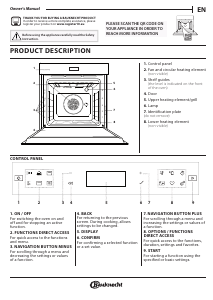
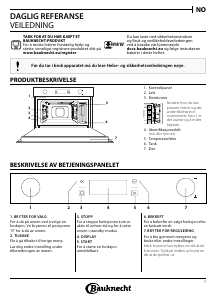
HOW TO USE THE TOUCH DISPLAY
To select or confirm:
Tap the screen to select the value or menu item
you require.
To scroll through a menu or a list:
Simply swipe your finger across the display to
scroll through the items or values.
To confirm settings or access the next screen:
Tap “SET or “NEXT.
To go back to the previous screen:
Tap .
FIRST TIME USE
You will need to configure the product when you
switch on the appliance for the first time.
The settings can be changed subsequently by pressing to
access the “Tools” menu.
1. SELECT THE LANGUAGE PREFERENCES
You will need to set the language and the time when
you switch on the appliance for the first time.
Swipe across the screen to scroll through the list of
available languages.
Tap the language you require.
2. SETTING UP WIFI
The 6th Sense Live feature allows you to he 6th Sense
Live feature allows you to operate the oven remotely
from a mobile device. To enable the appliance to be
controlled remotely, you will need to complete the
connection process successfully first. This process is
necessary to register your appliance and connect it to
your home network.
Tap Add Appliance” on the mobile App to proceed
with setup connection.
On the product, open the Tools/Connectivity/
Connect to network” section to begin the set up.
HOW TO SET UP THE CONNECTION
To use this feature you will need: A smartphone
or tablet and a wireless router connected to the
Internet. Please use your smart device to check that
your home wireless networks signal is strong close
to the appliance. The router or the mobile tethering
device must be different from the device on which
the mobile app is installed.
Minimum requirements.
Smart device: Android with a 1280x720 (or higher) screen or
iOS.
See on App store the app compatibility with Android or iOS
versions.
Wireless router: 2.4Ghz WiFi b/g/n.
1. Download the 6th Sense Live App
The first step to connecting your appliance is to
download the app on your mobile device. The 6th
Sense Live
App will guide you through all the steps
listed here. You can download the 6th Sense Live
App
from the App Store or the Google Play Store.
2. Create an account
If you haven’t done so already, you’ll need to create
an account. This will enable you to network your
appliances and also view and control them remotely.
3. Register your appliance
Follow the instructions in the app to register your
appliance. To complete the registration process you
will need:
The Smart appliance IDentifier (SAID) number
present in the Tools/Connectivity/Connect to
Network section,
The 12 digits product number that is present on
the product label,
Bluetooth connection active on your smartphone.
Once ready, add your appliance through the mobile
App and follow the instructions reported on it.
Note:
Bluetooth must be only during the registration
process.
The WiFi connection can be set up only through the
mobile app.
The connection procedure will only need to be
carried out again if you change your router settings
(e.g. network name or password or data provider).
3. SETTING THE TIME AND DATE
Connecting the oven to your home network will set
the time and date automatically. Otherwise you will
need to set them manually
Tap the relevant numbers to set the time.
Tap “SET to confirm.
Once you have set the time, you will need to set the date
Tap the relevant numbers to set the date.
Tap “SET to confirm.
After a long power loss, you need to set the time and
date again.
4. SET THE POWER CONSUMPTION
The oven is programmed to consume a level of
electrical power that is compatible with a domestic
network that has a rating of more than 3 kW (16
Ampere): If your household uses a lower power, you
will need to decrease this value (13 Ampere).
Tap the value on the right to select the power.
Tap “OKAY” to complete initial setup.
Last ned bruksanvisning på norsk (PDF, 25.32 MB)
(Tenk på miljøet og bare skriv ut denne bruksanvisningen hvis det virkelig er nødvendig)

Loading…

Vurdering

La oss få vite hva du syns om Bauknecht BBI11P8FHT2SK Ovn ved å gi en produktbedømmelse. Vil du dele dine erfaringer med dette produktet eller stille et spørsmål? Legg igjen en kommentar nederst på siden.
Er du fornøyd med Bauknecht BBI11P8FHT2SK Ovn?
Ja Nei
Vær den første til å bedømme dette produktet
0 stemmer

Bli med i samtalen om dette produktet

Her kan du dele hva du synes om Bauknecht BBI11P8FHT2SK Ovn. Hvis du har et spørsmål, les først bruksanvisningen nøye. Be om en bruksanvisning kan gjøres ved å bruke vårt kontaktskjema.

Mer om denne håndboken

Vi forstår at det er fint å ha en papirhåndbok for Bauknecht BBI11P8FHT2SK Ovn. Du kan alltid laste ned bruksanvisningen fra nettsiden vår og skrive den ut selv. Hvis du vil ha en original bruksanvisning, anbefaler vi at du kontakter Bauknecht. De kan kanskje gi en original bruksanvisning. Leter du etter bruksanvisningen til Bauknecht BBI11P8FHT2SK Ovn på et annet språk? Velg ditt foretrukne språk på hjemmesiden vår og søk etter modellnummeret for å se om vi har det tilgjengelig.

Spesifikasjoner

Merke Bauknecht
Modell BBI11P8FHT2SK
Kategori Ovner
Filtype PDF
Filstørrelse 25.32 MB

Alle bruksanvisninger for Bauknecht Ovner
Flere håndbøker for Ovner

Ofte stilte spørsmål om Bauknecht BBI11P8FHT2SK Ovn

Vårt supportteam søker etter nyttig produktinformasjon samt svar på ofte stilte spørsmål. Hvis du finner en feil i våre ofte stilte spørsmål, vennligst gi oss beskjed ved å benytte vårt kontaktskjema.

Ovnen min blir ikke varm nok, hva skal jeg gjøre? Verifisert

Termostaten sørger for at ovnene varmes opp til den angitte temperaturen. Det er sannsynlig at termostaten er defekt. Få den erstattet. Kontakt produsenten hvis du er i tvil.

Det var nyttig (3186) Les mer

Hva er pyrolyse? Verifisert

Noen ovner er utstyrt med en pyrolysefunksjon. Dette er et rengjøringssystem som forbrenner smuss og fett i ovnen ved å bruke veldig høye temperaturer. Etter pyrolyse vil alt smuss ha blitt til aske og kan lett fjernes. Hvis ovnen har en pyrolysefunksjon, anbefales det å bruke den 3 til 4 ganger i året for å holde ovnen ren.

Det var nyttig (3179) Les mer

Når jeg bruker ovnen, er det ofte matrester som faller på bunnen og forårsaker røyk. Hvordan kan jeg forhindre dette? Verifisert

Mange ovner kommer med både rist og stekebrett. Når mat tilberedes på risten, kan stekebrettet plasseres på bunnen for å forhindre at matrester brenner og forårsaker røyk.

Det var nyttig (808) Les mer

Røyk akkumuleres i ovnen når den varmes opp, hvorfor er det? Verifisert

Sannsynligvis er det matrester fra tidligere bruk igjen i ovnen. Spesielt fettete matrester kan generere røyk ved oppvarming. Rengjør ovnen grundig.

Det var nyttig (800) Les mer

Kan jeg tilberede flere ting samtidig ved å bruke flere grillbrett? Verifisert

Teknisk er dette mulig. Det avhenger imidlertid av matvaren om du trenger å justere tilberedningstiden eller bytte skuffene halvveis under tilberedningen.

Det var nyttig (795) Les mer
Bruksanvisning Bauknecht BBI11P8FHT2SK Ovn

Relaterte produkter

Relaterte kategorier

×
Download